Saturday, August 15, 2015

iPod touch (6th generation) vs. New Nintendo 3DS XL - Gizmag

It’s difficult to define the purpose of the iPod touch, but it’s fair to say that one of its biggest uses is gaming. How does it compare to the latest release in a long-running dedicated portable gaming line, the New 3DS XL?

Size

Even when it’s closed (as the measurements above reflect), the New 3DS XL is much larger than the sixth generation iPod touch, measuring 30 percent wider, 60 percent taller and 352 percent thicker. Suffice to say, the touch will feel much more comfortable than the 3DS in your pocket.

Weight

The 3DS is more than three and a half times heavier than the iPod touch.

Build

The build of the Nintendo handheld is unashamedly plastic, though this latest model does feel higher-end than older 3DS variants.

Colors

You can pick up Apple’s product in six different colors, while the New 3DS XL is only available in a choice of red or black.

Display size

The extra size of Nintendo’s system comes into play here, with the handheld offering two screens, both of which are considerably larger than that of the iPod touch.

Display resolution

It’s the opposite story when it comes to resolution, with the iPod touch’s screen providing 343 percent the pixels per inch you’ll find on the New 3DS XL. The top screen on Nintendo’s handheld doubles up vertical pixels to allow for the 3D effect, providing an effective resolution of 400 x 240 “per eye”.

Both the original 3DS, the 2DS and the New Nintendo 3DS (currently not available in the US) feature smaller screens than the current XL model, but the resolution is the same across all variants. You’ll find that you can easily pick out individual pixels on the XL’s larger displays.

Touchscreen

The iPod touch makes use of the same capacitive touch tech you’ll find on modern smartphones. The New 3DS XL’s lower screen is also touch-enabled, but it uses much older resistive tech. However, you generally interact with the 3DS’s touchscreen using the included stylus, so the outdated tech doesn’t have a negative impact on the experience.

Glasses-free 3D

One of the 3DS’s key features is its ability to provide glasses-free 3D gaming. This has actually been improved on the New 3DS models. It now uses face tracking tech to move the 3D sweet spot to wherever your eyes are, meaning you no longer have to hold the machine in the perfect position to avoid ruining the effect.

Physical controls

While many mobile games have come up with clever, innovative control schemes, using physical controls still feels far more accurate.

Nintendo actually added a few new controls with the release of the New 3DS XL. There’s a small secondary control stick, known as the C-Stick, which gives users better camera control in games such as Monster Hunter 4 Ultimate, as well as an extra set of shoulder buttons.

Stylus

As previously mentioned, the 3DS comes with a stylus that slides into the bottom edge of the casing.

Battery

Apple rates the sixth generation iPod touch for around 8 hours of video playback. The amount of gaming time you’ll get on Nintendo’s handheld varies wildly depending on whether you have the 3D effect switched on or not. Switch it off and you’ll get up to 7 hours of play time.

Charger included

As there have been so many different versions of the DS and 3DS, Nintendo has decided that most gamers will already have a compatible charger lying around, so they didn’t bother to put one in the box. It’s a cost-saving move, and one that’s not especially considerate of the consumer.

Processor

There’s a huge difference in what you’ll find powering these two machines. Apple’s device is powered by a speedy in-house chip, while the New 3DS offers a much more diminutive solution. A glance at the clock speed will give you an idea of just how big a difference there is between these processors.

That said, Nintendo has a knack for getting great visuals out of comparatively underpowered hardware. You’re certainly not going to see PS Vita level graphics on this thing, however selected titles, such as The Legend of Zelda: Majora’s Mask and Super Mario 3D World, look great. The glasses-free 3D also plays a big part here, lending graphically mediocre titles that extra visual pop.

Graphics

It’s a similar story here, with the iPod touch’s GPU far outstripping the 3DS’s.

RAM

The iPod touch packs more memory, but the New 3DS XL augments things with 10 MB VRAM.

Internal storage

Apple’s device can be configured with up to an expansive 128 GB internal storage, while the New 3DS XL packs only a single gigabyte of built-in space.

External storage

If you plan to download any games on Nintendo’s system, then you’ll need a microSD card. The company bundles in a 4GB card with every system, but that space will be quickly eaten up, so it’s advisable to pick up a higher capacity card.

Nintendo actually made some big changes to the external storage situation on the New 3DS line. Previous 3DS models made use of full-sized SD cards, and you used to be able to click them in and out as desired. With the current version of the system, the microDS card slot is hidden under the back cover, and you’ll need to undo several case screws to get at it.

Game formats

You can buy either physical or digital copies of games on Nintendo’s handheld console.

Cellular

Neither product is offered in a cellular variant.

Cameras

Apple made some big improvements with to the sixth generation iPod touch’s cameras, and they’ll take vastly superior shots compared to those you’ll get from the 3DS. There are dual lenses on the back of the Nintendo handheld, allowing you to take 3D snaps. Given the poor quality of the optics, the feature is more for developers than anything you’d ever want to use a camera.

Game storefront

Apple’s App Store is full of great casual games, and even offers a handful of console ports, such as Telltale’s excellent Game of Thrones series, numerous Grand Theft Auto titles and more. If you’re looking to get your Candy Crush fix, or are a fan of touch-centric titles like Monument Valley or the Infinity Blade series, then the iPod touch provides a great entry point into Apple’s extensive ecosystem.

However, if you’re looking for more AAA titles – thoroughbred gamer games – then the 3DS will be more to your liking. It’s worth noting that Nintendo’s systems tend to carry different sorts of games to those you’d find on the PS Vita or home consoles like the PS4 and Xbox One.

There’s a focus on family-friendly titles, and you’ll find a lot of side scrollers like Donkey Kong Country Returns 3D and New Super Mario Bros. 2. If you’re looking for more mature titles, such as first person shooters, then Sony’s handheld might be more up your street.

Software

The iPod touch runs on the same iOS 8 OS you’ll find on the latest iPhones and iPads. Like all other Nintendo consoles, the New 3DS XL relies on a proprietary OS that’s specific to the product line.

Release

While both devices technically launched this year, the New 3DS XL is just the latest refresh of a four year old product.

It has a little more horsepower than previous versions of the handheld, and there are one or two games that will only work on the new system (such as Xenoblade Chronicles 3D), but it’s really a variant of the same product Nintendo released back in 2011.

Starting price

Apple and Nintendo’s devices might be wildly different in almost every respect, but they have one thing in common – their asking price.

For more, you can check out Gizmag’s full reviews of the 6th-gen iPod touch and new 3DS XL.


ipod – Google News

Another Report Claims No iPad Air 3 Launching in Near Future - Mac Rumors

ipad_air_2_mini_3Apple is expected to announce new iPhones and iPads over the next month or so in preparation for the holiday shopping season, but it remains unclear which iPad models in particular will be unveiled.

It is widely believed that a new iPad mini 4 will be announced, but rumors about the iPad Air 3 and so-called “iPad Pro” and their respective release dates have been inconsistent thus far.

A new report from Taiwanese blog DigiTimes offers some further details, corroborating a previous rumor that Apple is not planning an iPad Air 3 right now and focusing its efforts on the iPad mini 4.

The report claims that Apple’s upstream supply chain is readying components for the fourth-generation tablet, noting that it will only have minor upgrades over the current iPad mini. Recent reports suggest the upcoming 7.9-inch tablet will likely be a slimmed down version of the iPad Air 2 and support split-view multitasking.

DigiTimes has a mixed track record at reporting on Apple’s upcoming product plans, so its latest report should be treated with a proverbial grain of salt. Moreover, the more reliable Japanese blog Mac Otakara reported in July that an A9-based iPad Air 3 is still possible for 2015, so Apple’s roadmap remains unclear and could change between now and the forthcoming iPhone and iPad event.

Apple has faced six consecutive quarters of declining iPad sales year-over-year as the broader tablet market continues to decline.

Related roundup: iPad Air 2 , Tags: digitimes.com, iPad Air 3


ipad – Google News

iPhone 6S or 7: new phone won't sell, says analyst - The Week UK

As we near the likely launch date of the new iPhone, which may be called either the iPhone 6S or iPhone 7, Wall Street is getting jumpy about its chances of driving up Apple’s revenues and profits.

“Apple is slumping as the usually high-flying tech company struggles to impress investors with the burden of raised expectations,” News.com.au reports.

Acknowledging that the company sold 47 million iPhones last quarter, 35 per cent more than a year ago, it nevertheless notes that analysts had expected even more – and suggests that there could be worse news to come.

“KGI Securities, which has an accurate track record when it comes to predicting the success of future Apple products, is now forecasting zero or even negative growth of iPhone sales in the last quarter of 2015,” the paper reports.

In other words, the iPhone 6S or iPhone 7 will sell less well than its predecessor.

The result has been a sharp sell-off of Apple shares, which peaked at $ 133.60 in February. They closed yesterday at $ 115.24, a fall of 14 per cent since then  - in part because China’s falling currency will make imports more expensive, hurting iPhone sales there (see video below).

Even so, Apple remains by some margin the most valuable company in the world by market capitalisation.

Video: Apple’s China problem

iPhone 6S or 7: launch ‘set for 9 September’

Here’s what we know about the iPhone 6S – or could it be the iPhone 7? – a month before its likely launch date

13 August

Apple is planning to reveal its new smartphone – likely to be called either the iPhone 6S or iPhone 7 – on Wednesday 9 September, according to reports that have been seized on by Apple enthusiasts.

And today a significant leak set out the way in which Apple plans to implement what is likely to be the most significant new feature – Force Touch.

Force Touch for iPhone

For several months Apple has been expected to furnish the iPhone 6S or 7 with Force Touch, a new input method already available on the Apple Watch and MacBook laptop. But now we know precisely how it will work on the smartphone, if today’s leak turns out to be correct.

Force Touch makes use of a modified touchscreen which can differentiate between a light tap and a longer, harder touch, and react differently to each. For example, on the Apple Watch, a light tap on an email opens it up to be read, while more sustained pressure takes the user directly to the reply screen.

On the iPhone 6S or 7, says 9to5Mac, Force Touch will let you skip long lists of menus.

“A user can look up a point of interest in the Maps application, and then Force Touch on the destination to immediately begin turn-by-turn directions, the website says. “Currently, if a user wants to start navigating to a destination, she must search for the point of interest, click the navigation logo on the map view, then click another button to actually start navigating. In this case, the Force Touch gesture will skip two steps.”

In other contexts, Force Touch will bring up menus containing further options, for example a firm press on the phone icon on the home screen will let you “shortcut directly to the voicemail tab”.

iPhone 6S or 7 launch date

Late last week, details emerged about when Apple would unveil the 2015 iPhone upgrade.

“The company intends to hold a special event the week of Sept. 7, with Wednesday the 9th being the most likely date,” reports John Paczkowski of Buzzfeed.

Tech news site MacRumors says Paczkowski “has provided reliable information on event dates in the past”, but a Wednesday launch for the iPhone 7 would break with recent Apple tradition. For the past two years, Apple has held each of its annual iPhone events on a Tuesday, with the new models going on sale on the Friday of the following week. For that reason, The Independent suggests that Tuesday 8 September is the likely launch date.

Doubt also surrounds the extent of the changes planned for Apple’s flagship phone – as well as the new model’s name.


Most commentators say the company will keep to its usual product launch schedule, in which it follows an all-new product one year with minor upgrades the next.

After last year’s iPhone 6, which brought in a new look, larger screens and significant new features, major changes this autumn would come as a surprise. Therefore, they say, the 2015 model will be called the iPhone 6S.

But Ming-Chi Kuo, an analyst at KGI Securities with contacts inside Apple’s Chinese and Taiwanese supply chains, has said that this year’s upgrade will be substantial enough for Apple to justify breaking with tradition and calling the new phone the iPhone 7.

Apple itself never comments on new products until their official launch, but the company’s new operating system, iOS 9, reveals many of the developments we can expect in the iPhone 6S or iPhone 7.

“Updates and features include Siri becoming more proactive in recognising your behaviour, longer battery life and improvements to existing apps including Maps and Notes,” says the Daily Telegraph. “The new News app aims to provide an experience akin to reading a magazine, with big glossy visuals.”

  • iPhone 7: 14 features for business users

One expert scouring the code of iOS 9, which has already been released to app developers, has found evidence to suggest that the new iPhone will have a much-improved front-facing camera.

Hamsa Sood says the iPhone 7′s “selfie-cam” will be capable of shooting slow-motion, 240 frame-per-second video, along with 1080p video at normal speed, and panoramic still images. Other leaked information is yet to back up this theory, but Sood has been a reliable source of advance information about previous Apple launches.

Most analysts are agreed that Apple will have to increase the resolution of the rear-facing camera to at least 12 megapixels in order to keep pace with rivals, and some have suggested that Apple is planning an even more significant camera upgrade (see below).

More iPhone 6S and iPhone 7 rumours

There’s nothing like a new Apple product to fire up the rumour mill. Here’s what tech insiders think we can expect from the iPhone 7:

More powerful processor: Back in January a Taiwanese tech news website reported that sources in the Apple supply chain had revealed that the iPhone 6S would have 2GB of Ram, twice what’s available in the iPhone 6. It seemed like a credible claim given that Apple often upgrades processor chips the year after it releases an all-new iPhone design, and it has since been backed up by similar reports from other sources. AppleInsider reported last week that its own inside man has confirmed that the new phones will go on sale with a 2GB chip. “Additional Ram would allow iOS to leave background tasks and tabs in Safari open for longer without a need to reload or refresh,” it says. “But additional RAM can also come with costs to battery life, as memory constantly consumes power.”

Sapphire crystal display: Persistent rumours and reports suggested that the last iPhone would benefit from a sapphire crystal screen coating - and immensely strong glass-like substance that is highly scratch resistance - but in the end it never materialised. Reports suggest that Apple and its suppliers had trouble manufacturing sufficient quantities to equip the iPhone 6 and 6 Plus, but already the rumour mill is chattering about the prospect of a sapphire crystal iPhone 7. That may be wishful thinking, but the company did use sapphire crystal for the Apple Watch, which launched in the spring – and has been keen to transfer technology from the watch to its smartphones.

Dual-lens camera: In February rumours emerged that the camera could be in line for a substantial overhaul. John Gruber of Daring Fireball, a respected source of Apple information, said he has heard that the iPhone 7 might get “the biggest camera jump ever”. He added: “I don’t even know what sense this makes, but I’ve heard that it’s some kind of weird two-lens system where the back camera uses two lenses and it somehow takes it up into DSLR quality imagery.” That vague suggestion has now been largely discredited, as adding a second lens to the rear of the camera would require a thorough redesign of the handset chassis, and that’s unlikely so soon after the all-new iPhone 6 was released (see below). Nevertheless, much speculation has been devoted to the camera, and changes are still expected.

Few high-profile design changes: Having come up with an all-new aesthetic for the iPhone 6, Apple is unlikely to alter the overall look and feel of the handset for the next update. Until recently, the assumption was that the iPhone 6S or iPhone 7 would look all but identical to its predecessor, but the latest reports suggest that the new phone may be slightly thicker, taller and wider (see above). Most analysts still believe that there will be no dramatic redesign, with most physical changes imperceptible at first glance. 

New aluminium frame: Although the design is unlikely to change substantially, it may be built from a new material. According to Taiwan’s Economic Daily News, Apple is planning to make use of the “Series 7000″ aluminium alloy it developed for the Apple Watch on its smartphones too. The metal is “designed to be 60 per cent stronger than most aluminum, and one-third the density of stainless steel, while still maintaining a light weight”, MacRumors says.

Higher-resolution screen: When Apple launched the iPhone 4 in June 2010, it said the “Retina” screen provided the maximum resolution perceptible to the human eye. Nevertheless, it stepped up resolution for the iPhone 6 Plus, boosting pixels per inch from 326 to 401 for its supersized smartphone and describing the new screen as a “Retina HD Display”. The 4.7-inch model retained the 326ppi screen, but reports from China quoting supply chain sources suggest that the smaller version of the iPhone 7 may get a screen that’s slightly larger and significantly sharper. “The iPhone 7 could very well sport a five-inch screen with 400ppi resolution,” says 

iPhone 7 concept


Four-inch iPhone 6C or 7C: The rumour that refuses to die… Perhaps more in hope than expectation, a range of Apple-watchers have been predicting that the company will supplement its iPhone range with a high-spec four-inch-screen iPhone mini. Apple used to specialise in small-screened phones, but since the launch of the iPhone 6 and 6 Plus, fans of four-inchers have had to make do with the 5S which is beginning to show its age. Leaks suggest that Apple will keep building a four-inch phone, but it remains unclear whether it will be an all-new iPhone Mini or an updated version of the 5S.

A trade-in scheme for non iPhone users: iPhone owners are already able to trade in old phones for the latest models, and now Apple is planning to extend the offer to owners of smartphones made by other companies. “Apple will soon introduce a new recycling and trade-in program that will accept non-Apple smartphones, notably including Android and BlackBerry devices, in exchange for gift cards to be used toward the purchase of new iPhones,” reports 

iPhone 7: ‘ugly’ plastic strips to remain on new iPhone

8 August

When Apple unveils its next smartphone – likely to be called either the iPhone 6S or iPhone 7 – it will retain one of its predecessor’s least-loved features: the translucent plastic strips on the rear of the handset.

Recent reports had suggested that Apple was working to replace the plastic tramlines, which let radio waves penetrate the iPhone’s aluminium casing. 

iPhone 7 concept


iphone – Google News

Haute Dog: MAC Cosmetics Launches New Canine-Inspired Collection - Hollywood Life

MAC Cosmetics Dog Collection

Courtesy of MAC


  • Feedback
  • Contact Us
  • Advertise with Us
  • Corporate
  • Privacy Policy
  • Terms of Service


mac – Google News

Friday, August 14, 2015

Apple pushing iPad in business as sales fall - TechRepublic

iPad

Apple is selling fewer iPads. Oh, sure, it’s still selling a lot of the sleek tablets, just not as many as a year or two ago. Part of this, perhaps, is due to the release of the iPhone 6 and 6 Plus a year ago, because they have larger screens. Or maybe the upgrade cycle for tablets isn’t as quick as the one for smartphones. Either way, it’s not just the iPad that’s slipping: the whole tablet market has been moving backwards.

Whatever the reason, Apple is looking well beyond the consumer market to sell more tablets. Much of Apple’s partnership with IBM has focused on delivering iPad apps to targeted verticals and to ensure support for enterprise-wide deployments of the tablets.

According to a report in The Wall Street Journal, Apple is working with more than 40 app developers and other companies to further improve the iPad as a business tool.

Apple is said to have invited representatives from third-party companies to train its employees in their apps and other programs so Apple can better sell companies on the iPad. The partnership is said to already be paying dividends, as companies connect their customers with Apple, and Apple connects companies so they can create interconnected apps.

Apple is calling it the “mobility partner program,” or MPP, and the company is (as per the norm) keeping much of the program secret, even from participants.

Companies are making apps that handle small business accounting, digital cash registers, employee scheduling software, restaurant apps, and more. The program is even reaching out to small business customers at Apple’s retail stores. Capturing business customers at retail stores has been a focus for years, but it seems to be taking on new life. One retail store customer said in the WSJ piece that Apple representatives seemed “genuinely interested in my [four-person] business and in helping me grow.”

If Apple can get in on the ground floor with small businesses, they can be well positioned as they grow. According to the WSJ, Apple hopes to package bundles of apps that work well together and sell them to targeted verticals.

For business owners, the goal is to make the technology simpler and more transparent, much like many consumers do with Apple’s devices. One business owner said they could focus on the strategy of running their business rather than worrying about the technology.

By leveraging Apple’s traditional ease of use into the business market, the company could increase sales by offering a complete package like they do for consumers. Apple’s productivity suite (Pages, Numbers, and Keynote), plus it’s lifestyle apps like Photos, iMovie, and GarageBand are included free both on OS X and iOS devices. It’s likely that Apple is looking to offer business- or vertical-focused app suites to customers for reasonable prices as well, especially since anything that can save business owners time will likely also save them money, which they can then use to buy more Apple products.

  • iPad market share drops as worldwide tablet market slides
  • With so many iPad SKUs, has Apple lost its focus?
  • Tim Cook reaffirms his belief in the iPad’s potential
  • Six scenarios where the iPad is trouncing the PC


ipad – Google News

iPhone 6S or 7: new phone won't sell, says analyst - The Week UK

As we near the likely launch date of the new iPhone, which may be called either the iPhone 6S or iPhone 7, Wall Street is getting jumpy about its chances of driving up Apple’s revenues and profits.

“Apple is slumping as the usually high-flying tech company struggles to impress investors with the burden of raised expectations,” News.com.au reports.

Acknowledging that the company sold 47 million iPhones last quarter, 35 per cent more than a year ago, it nevertheless notes that analysts had expected even more – and suggests that there could be worse news to come.

“KGI Securities, which has an accurate track record when it comes to predicting the success of future Apple products, is now forecasting zero or even negative growth of iPhone sales in the last quarter of 2015,” the paper reports.

In other words, the iPhone 6S or iPhone 7 will sell less well than its predecessor.

The result has been a sharp sell-off of Apple shares, which peaked at $ 133.60 in February. They closed yesterday at $ 115.24, a fall of 14 per cent since then  - in part because China’s falling currency will make imports more expensive, hurting iPhone sales there (see video below).

Even so, Apple remains by some margin the most valuable company in the world by market capitalisation.

Video: Apple’s China problem

iPhone 6S or 7: launch ‘set for 9 September’

Here’s what we know about the iPhone 6S – or could it be the iPhone 7? – a month before its likely launch date

13 August

Apple is planning to reveal its new smartphone – likely to be called either the iPhone 6S or iPhone 7 – on Wednesday 9 September, according to reports that have been seized on by Apple enthusiasts.

And today a significant leak set out the way in which Apple plans to implement what is likely to be the most significant new feature – Force Touch.

Force Touch for iPhone

For several months Apple has been expected to furnish the iPhone 6S or 7 with Force Touch, a new input method already available on the Apple Watch and MacBook laptop. But now we know precisely how it will work on the smartphone, if today’s leak turns out to be correct.

Force Touch makes use of a modified touchscreen which can differentiate between a light tap and a longer, harder touch, and react differently to each. For example, on the Apple Watch, a light tap on an email opens it up to be read, while more sustained pressure takes the user directly to the reply screen.

On the iPhone 6S or 7, says 9to5Mac, Force Touch will let you skip long lists of menus.

“A user can look up a point of interest in the Maps application, and then Force Touch on the destination to immediately begin turn-by-turn directions, the website says. “Currently, if a user wants to start navigating to a destination, she must search for the point of interest, click the navigation logo on the map view, then click another button to actually start navigating. In this case, the Force Touch gesture will skip two steps.”

In other contexts, Force Touch will bring up menus containing further options, for example a firm press on the phone icon on the home screen will let you “shortcut directly to the voicemail tab”.

iPhone 6S or 7 launch date

Late last week, details emerged about when Apple would unveil the 2015 iPhone upgrade.

“The company intends to hold a special event the week of Sept. 7, with Wednesday the 9th being the most likely date,” reports John Paczkowski of Buzzfeed.

Tech news site MacRumors says Paczkowski “has provided reliable information on event dates in the past”, but a Wednesday launch for the iPhone 7 would break with recent Apple tradition. For the past two years, Apple has held each of its annual iPhone events on a Tuesday, with the new models going on sale on the Friday of the following week. For that reason, The Independent suggests that Tuesday 8 September is the likely launch date.

Doubt also surrounds the extent of the changes planned for Apple’s flagship phone – as well as the new model’s name.


Most commentators say the company will keep to its usual product launch schedule, in which it follows an all-new product one year with minor upgrades the next.

After last year’s iPhone 6, which brought in a new look, larger screens and significant new features, major changes this autumn would come as a surprise. Therefore, they say, the 2015 model will be called the iPhone 6S.

But Ming-Chi Kuo, an analyst at KGI Securities with contacts inside Apple’s Chinese and Taiwanese supply chains, has said that this year’s upgrade will be substantial enough for Apple to justify breaking with tradition and calling the new phone the iPhone 7.

Apple itself never comments on new products until their official launch, but the company’s new operating system, iOS 9, reveals many of the developments we can expect in the iPhone 6S or iPhone 7.

“Updates and features include Siri becoming more proactive in recognising your behaviour, longer battery life and improvements to existing apps including Maps and Notes,” says the Daily Telegraph. “The new News app aims to provide an experience akin to reading a magazine, with big glossy visuals.”

  • iPhone 7: 14 features for business users

One expert scouring the code of iOS 9, which has already been released to app developers, has found evidence to suggest that the new iPhone will have a much-improved front-facing camera.

Hamsa Sood says the iPhone 7′s “selfie-cam” will be capable of shooting slow-motion, 240 frame-per-second video, along with 1080p video at normal speed, and panoramic still images. Other leaked information is yet to back up this theory, but Sood has been a reliable source of advance information about previous Apple launches.

Most analysts are agreed that Apple will have to increase the resolution of the rear-facing camera to at least 12 megapixels in order to keep pace with rivals, and some have suggested that Apple is planning an even more significant camera upgrade (see below).

More iPhone 6S and iPhone 7 rumours

There’s nothing like a new Apple product to fire up the rumour mill. Here’s what tech insiders think we can expect from the iPhone 7:

More powerful processor: Back in January a Taiwanese tech news website reported that sources in the Apple supply chain had revealed that the iPhone 6S would have 2GB of Ram, twice what’s available in the iPhone 6. It seemed like a credible claim given that Apple often upgrades processor chips the year after it releases an all-new iPhone design, and it has since been backed up by similar reports from other sources. AppleInsider reported last week that its own inside man has confirmed that the new phones will go on sale with a 2GB chip. “Additional Ram would allow iOS to leave background tasks and tabs in Safari open for longer without a need to reload or refresh,” it says. “But additional RAM can also come with costs to battery life, as memory constantly consumes power.”

Sapphire crystal display: Persistent rumours and reports suggested that the last iPhone would benefit from a sapphire crystal screen coating - and immensely strong glass-like substance that is highly scratch resistance - but in the end it never materialised. Reports suggest that Apple and its suppliers had trouble manufacturing sufficient quantities to equip the iPhone 6 and 6 Plus, but already the rumour mill is chattering about the prospect of a sapphire crystal iPhone 7. That may be wishful thinking, but the company did use sapphire crystal for the Apple Watch, which launched in the spring – and has been keen to transfer technology from the watch to its smartphones.

Dual-lens camera: In February rumours emerged that the camera could be in line for a substantial overhaul. John Gruber of Daring Fireball, a respected source of Apple information, said he has heard that the iPhone 7 might get “the biggest camera jump ever”. He added: “I don’t even know what sense this makes, but I’ve heard that it’s some kind of weird two-lens system where the back camera uses two lenses and it somehow takes it up into DSLR quality imagery.” That vague suggestion has now been largely discredited, as adding a second lens to the rear of the camera would require a thorough redesign of the handset chassis, and that’s unlikely so soon after the all-new iPhone 6 was released (see below). Nevertheless, much speculation has been devoted to the camera, and changes are still expected.

Few high-profile design changes: Having come up with an all-new aesthetic for the iPhone 6, Apple is unlikely to alter the overall look and feel of the handset for the next update. Until recently, the assumption was that the iPhone 6S or iPhone 7 would look all but identical to its predecessor, but the latest reports suggest that the new phone may be slightly thicker, taller and wider (see above). Most analysts still believe that there will be no dramatic redesign, with most physical changes imperceptible at first glance. 

New aluminium frame: Although the design is unlikely to change substantially, it may be built from a new material. According to Taiwan’s Economic Daily News, Apple is planning to make use of the “Series 7000″ aluminium alloy it developed for the Apple Watch on its smartphones too. The metal is “designed to be 60 per cent stronger than most aluminum, and one-third the density of stainless steel, while still maintaining a light weight”, MacRumors says.

Higher-resolution screen: When Apple launched the iPhone 4 in June 2010, it said the “Retina” screen provided the maximum resolution perceptible to the human eye. Nevertheless, it stepped up resolution for the iPhone 6 Plus, boosting pixels per inch from 326 to 401 for its supersized smartphone and describing the new screen as a “Retina HD Display”. The 4.7-inch model retained the 326ppi screen, but reports from China quoting supply chain sources suggest that the smaller version of the iPhone 7 may get a screen that’s slightly larger and significantly sharper. “The iPhone 7 could very well sport a five-inch screen with 400ppi resolution,” says 

iPhone 7 concept


Four-inch iPhone 6C or 7C: The rumour that refuses to die… Perhaps more in hope than expectation, a range of Apple-watchers have been predicting that the company will supplement its iPhone range with a high-spec four-inch-screen iPhone mini. Apple used to specialise in small-screened phones, but since the launch of the iPhone 6 and 6 Plus, fans of four-inchers have had to make do with the 5S which is beginning to show its age. Leaks suggest that Apple will keep building a four-inch phone, but it remains unclear whether it will be an all-new iPhone Mini or an updated version of the 5S.

A trade-in scheme for non iPhone users: iPhone owners are already able to trade in old phones for the latest models, and now Apple is planning to extend the offer to owners of smartphones made by other companies. “Apple will soon introduce a new recycling and trade-in program that will accept non-Apple smartphones, notably including Android and BlackBerry devices, in exchange for gift cards to be used toward the purchase of new iPhones,” reports 

iPhone 7: ‘ugly’ plastic strips to remain on new iPhone

8 August

When Apple unveils its next smartphone – likely to be called either the iPhone 6S or iPhone 7 – it will retain one of its predecessor’s least-loved features: the translucent plastic strips on the rear of the handset.

Recent reports had suggested that Apple was working to replace the plastic tramlines, which let radio waves penetrate the iPhone’s aluminium casing. 

iPhone 7 concept


iphone – Google News

Saturday, April 18, 2015

10 essential Finder tricks every Mac user should know - Cult of Mac

Photo: Yeray Hdez Guerra/FlickrCC

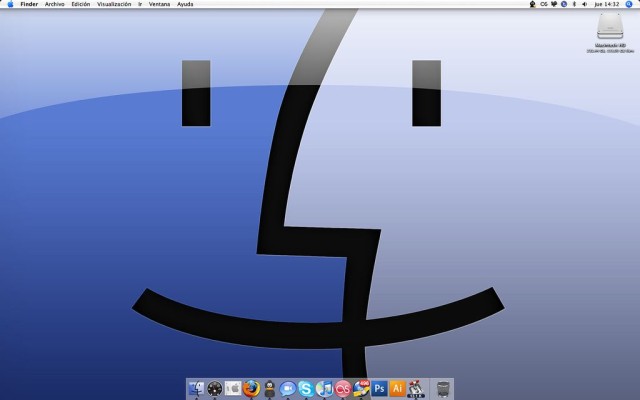
In Mac OS X, you'll spend much of your time in the Finder, the part of your operating system that manages files and such. While you might think you know all there is to know about it, the Finder is a complex and wonderful app — with its own special tricks to master.

Here are 10 essential Finder tips that will help you get the most out of your time working or playing on your Mac.

Make Quick Look even cooler

quicklook index

quicklook index

Surely you've used the Finder's Quick Look to see a document or image up close on the fly without having to open the associated app. (You do this by simply hitting the space bar when you have a file or files highlighted in the Finder.)

Even cooler? Getting a full-screen slideshow, complete with available index sheet, by hitting Option-space bar with several files selected. You'll be able to scroll through them all with the arrow keys, either onscreen or on your keyboard, and if you click the little Index button, you'll see all your selected files on one screen. Click on the one you want to see full-size, or hit Esc to get back to the Finder.

Show your Home Directory in the Sidebar

home folder

home folder

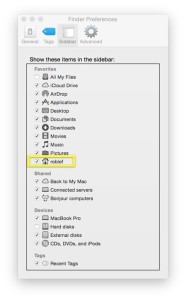
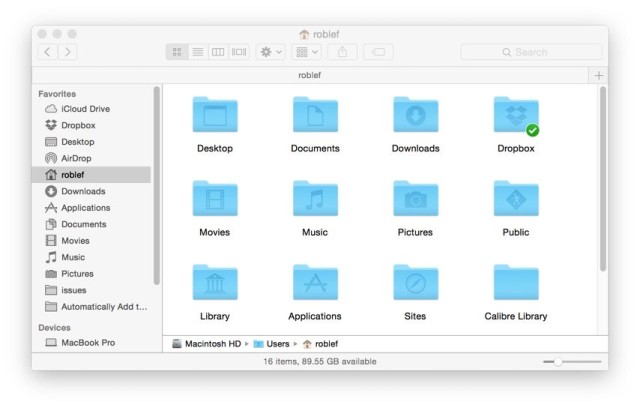
Your Home folder contains all your stuff, including documents, photos and music. It makes sense to show it in the Finder's Sidebar, which is itself a collection of all the things you use often.

To make the Home folder show up, simply choose Preferences from the Finder menu (or hit Command-comma when you're in the Finder). Then click the little checkbox to the left of your Home folder's name. Then open a Finder window and drag and drop your Home folder wherever you'd like it. I like to keep it near the top of my sidebar items.

Show the Status and Path bars

path status bars

path status bars

These two bars reside at the bottom of any Finder window, giving you important info about your Mac. The Status bar will show you how many items you have in a specific folder as well as how much free storage you have left on your hard disk, while the Path bar will show you the folder path of any highlighted file or folder in the Finder.

Both are useful, and both can be enabled in the View menu. Simply select Show Path Bar or Show Status bar from the View menu in the Finder, or hit Command-/ or Option-Command-P to show and hide them, respectively.

Master the menubar status icons

menubar

menubar

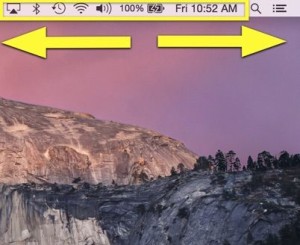
If your menubar is loaded with a ton of status icons, you can reorder them and even make them disappear.

To rearrange them, simply hold down the Command button on your keyboard, then drag and drop the icons into the order that most pleases you. This applies to the Apple-provided ones, mostly, as third-party apps don't necessarily allow this trick.

If you want to get rid of the icons, simply Command-click and drag one of the menubar icons toward the middle of the screen. When you let go, the menubar icon will disappear in a cute little puff of simulated smoke, just like when you drag an icon off the Dock. Nice, huh?

If you want them back, simply find the relevant preference pane in System Preferences and click "Show in Menubar."

Theme your screen your own way

contrast

contrast

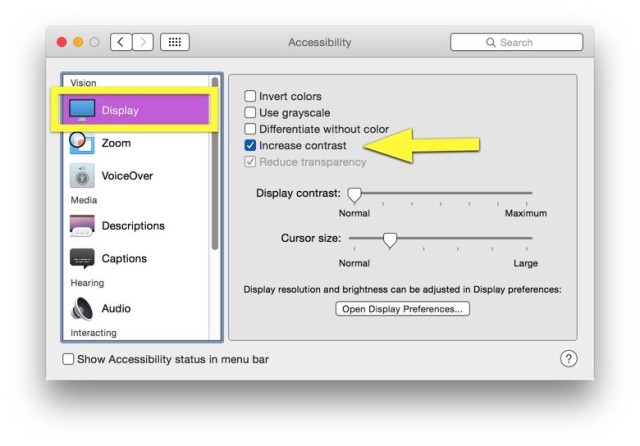
OS X's look has gotten flatter and less skeuomorphic these days, but if you have a need for an even sharper, more contrasty look, you're in luck. Simply launch System Preferences, click on Accessibility, and then click on Display in the left pane.

Click the checkbox next to Increase contrast to get a more OS 9-like look, complete with darker colors and lighter backgrounds. If you want to kick up the contrast another notch, head to the General section of System Preferences and check off the "Use dark menu bar and Dock" option, just under the Appearance drop-down menu.

Make smarter folders

smart folder

smart folder

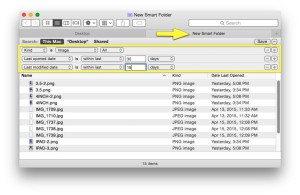
Smart Folders can be super-useful, as they collect files or apps into one folder according to specific criteria set up by you. To make one, simply choose New Smart Folder from the File menu in the Finder. You can also hit Command-Option-N on your keyboard, then type in a topic, phrase or other parameter into the search field.

Pro tip: just like when you're searching in a regular window in the Finder, you can limit the search to only the names of files by choosing "Name matches" in the menu that appears, and clicking on Name, then Filename.

Rename more than one file at once

batch rename

batch rename

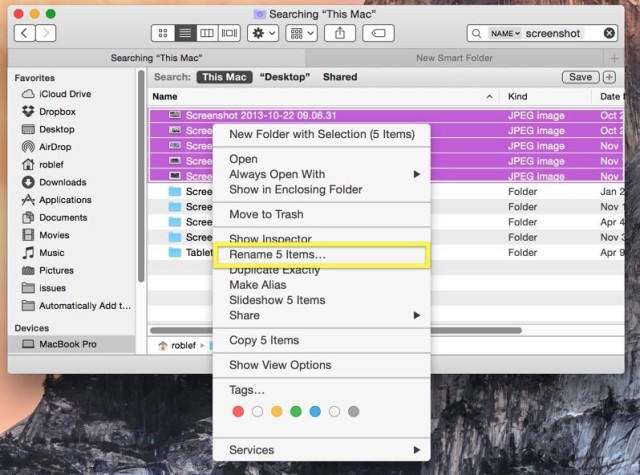
You know when you have 47 different files, all named Screenshot? Well, it's super-easy to rename them all to something better, like Cat Pictures, right in the Finder.

All you need to do is select all the files you want to rename, then right-click (or Control-Click) on any of them. Next, click on the contextual menu item "Rename X Items," where X is the number of files you've selected. Then you can do a simple replace text rename, add text to the end of the current file name, or append a number, counter or date at the end using the pop-up menu provided. It's pretty robust — give it a try.

Relaunch the Finder

relaunch

relaunch

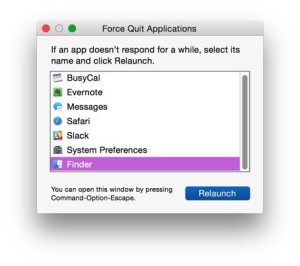
There comes a time when even the hardiest app on your Mac, the Finder, will freeze or crash. You can always reboot at times like this, or shut down with a long press and hold to your power button, but try to relaunch the Finder first.

It's just like Force Quitting any other app — simply hit the Option-Command-Esc key combination to bring up the Force Quit dialog box. You may need to Command-Tab your way to a different, non-crashed app first to see it. Once you see the dialog, highlight the Finder in the list and click Relaunch. This can save you some valuable time as an alternative to rebooting your whole Mac.

Customize Finder window toolbars

customize toolbar

customize toolbar

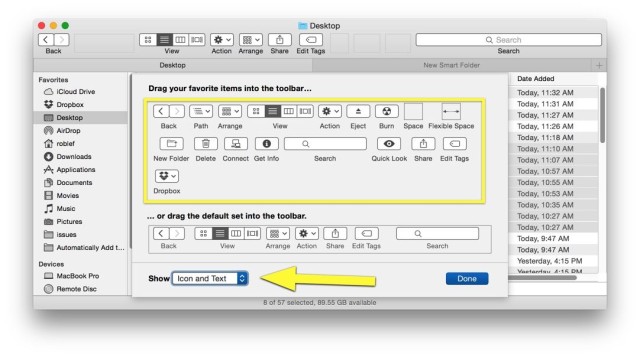
There's a wealth of helpful widgets and buttons at the top of any Finder window, and for the most part, the default set will do you just fine.

If, however, you want to add or delete anything up there, all you have to do is right-click (or Control-Click) on an empty space in the toolbar itself and choose Customize Toolbar from the contextual menu that pops up. Then drag and drop to your heart's content, or — to reset it — drag the default set up from the bottom of the panel.

Pro tip: Choose Icon only, Text only or Icon and Text for a more- or less-informative look to the set of icons in the toolbar.

Set your default folder

default

default

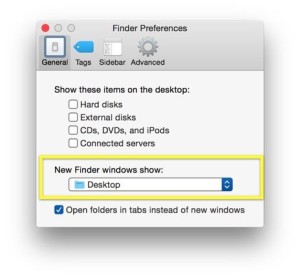
When you open a Finder window, it defaults to a specific folder (usually Home). If you want a different folder to appear when you open a new Finder window, click on the Finder menu, then Preferences (or hit Command-Comma when in the Finder). You'll be able to choose any folder from the drop-down menu "New Finder windows show" item.

When you click there, you'll get some suggestions, like your hard disk, your Home folder and All Files. Or you can choose Other and navigate to whatever folder you want. Like a boss.


mac – Google News